

In the previous part I solved 1 ascii challenge and 4 asm code challenges to help you understand the basic theory, so this part will focus on how functions interact with each other and on sharpening your thinking when it comes to exploiting them. ^-^.
#Picker I
Hints: Can you point the program to a function that does something useful for you?
Reading through the code, there are a few functions, but we’ll only focus on 2 of them: getRandomNumber() and win().
getRandomNumber(): This function’s only job is to print4when called. So we can probably skip it.
def getRandomNumber():
  print(4)  # Chosen by fair die roll.
            # Guaranteed to be random.
            # (See XKCD)
win(): here we can see the flag sitting right inside it, and when run on the server, we can grab the flag just by calling thiswin()function. So now the only thing left to do is run it and grab the flag ~
def win():
  # This line will not work locally unless you create your own 'flag.txt' in
  #   the same directory as this script
  flag = open('flag.txt', 'r').read()
  #flag = flag[:-1]
  flag = flag.strip()
  str_flag = ''
  for c in flag:
    str_flag += str(hex(ord(c))) + ' '
  print(str_flag)
TIPAlways run and test locally first before trying it on the server, since the source code won’t have the files we need, like flag.txt.
Calling win() gives us the following message:
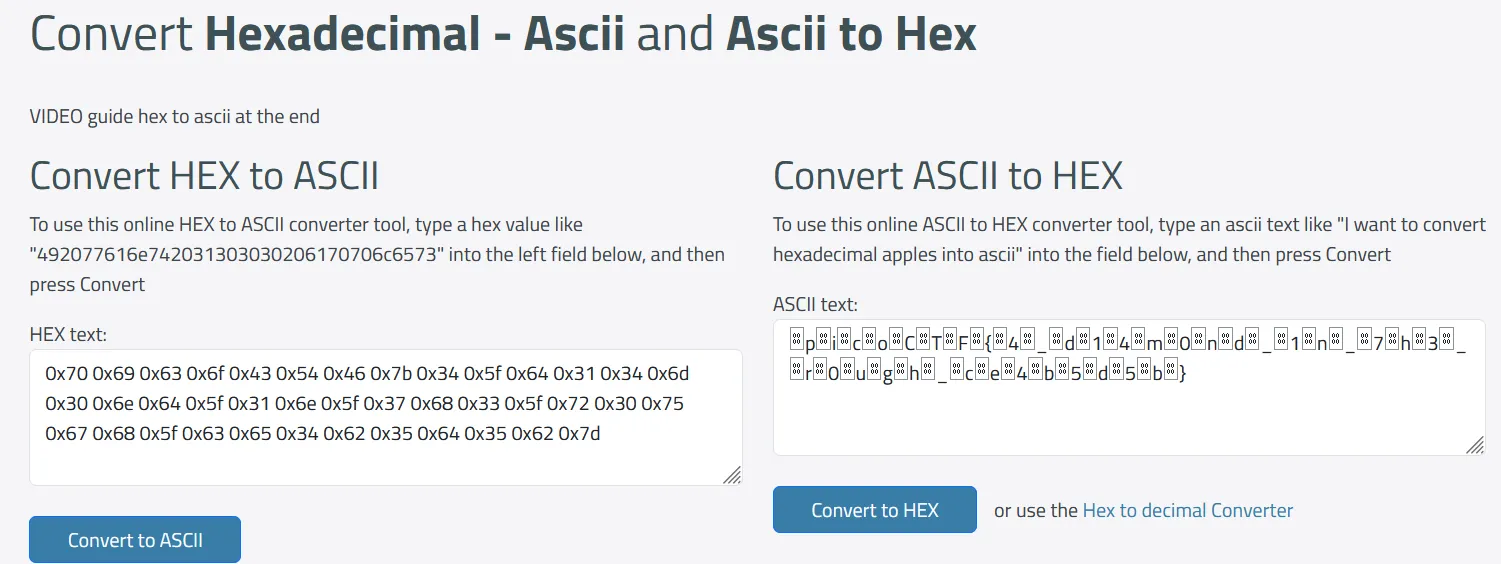
0x70 0x69 0x63 0x6f 0x43 0x54 0x46 0x7b 0x34 0x5f 0x64 0x31 0x34 0x6d 0x30 0x6e 0x64 0x5f 0x31 0x6e 0x5f 0x37 0x68 0x33 0x5f 0x72 0x30 0x75 0x67 0x68 0x5f 0x63 0x65 0x34 0x62 0x35 0x64 0x35 0x62 0x7d
So now what? Well… you’ve got 2 options here:
- Option 1: Use an online
hex to asciiconverter website.
- Option 2 (the more fun one): Write a Python script to convert it yourself.
Mindset: Take the hex -> split it into a list -> convert from hex to ascii using chr().
hex = "0x70 0x69 0x63 0x6f 0x43 0x54 0x46 0x7b " \
      "0x34 0x5f 0x64 0x31 0x34 0x6d 0x30 0x6e " \
      "0x64 0x5f 0x31 0x6e 0x5f 0x37 0x68 0x33 " \
      "0x5f 0x72 0x30 0x75 0x67 0x68 0x5f 0x63 " \
      "0x65 0x34 0x62 0x35 0x64 0x35 0x62 0x7d"

print(''.join([chr(int(x, 16)) for x in hex.split()]))
Result:

Flag: picoCTF{4_d14m0nd_1n_7h3_r0ugh_ce4b5d5b}
#Picker II
In this challenge, we know what we’re capable of here - and that’s calling a function to force it to print the flag.
So Picker II works the same way: find a way to call the function and force it to give up the flag.
In this code, there’s now an extra filter function that processes the user’s input, which means the author is trying to stop us from calling win directly.
So is there really no way to call win? Does that mean there’s no way left to grab the flag?
I’d suggest thinking a bit more creatively. Why would we be forced to call the whole function, when we could just call the lines inside it instead ~
Here’s how I got the flag out, based on the sub-statements inside the win function:

If you just drop the line open('flag.txt', 'r').read() in by itself, you’ll run into an invalid input error, because the filter function is filtering out the string win, which means whatever we submit also has to be in string form. So the correct syntax has to be print(open('flag.txt', 'r').read()) - that’s what correctly turns the whole piece of code into a string.
And just like that we’ve successfully bypassed this check - now all that’s left is to run it on the server to grab the flag.
Flag: picoCTF{f1l73r5_f41l_c0d3_r3f4c70r_m1gh7_5ucc33d_b924e8e5}
#Picker III
This is the 3rd version of the “find a way to call the function” challenge. It’s a bit different from the earlier ones in that you really need to understand the code to grasp all the functions you’ll be interacting with, in order to use them to create a vulnerability.
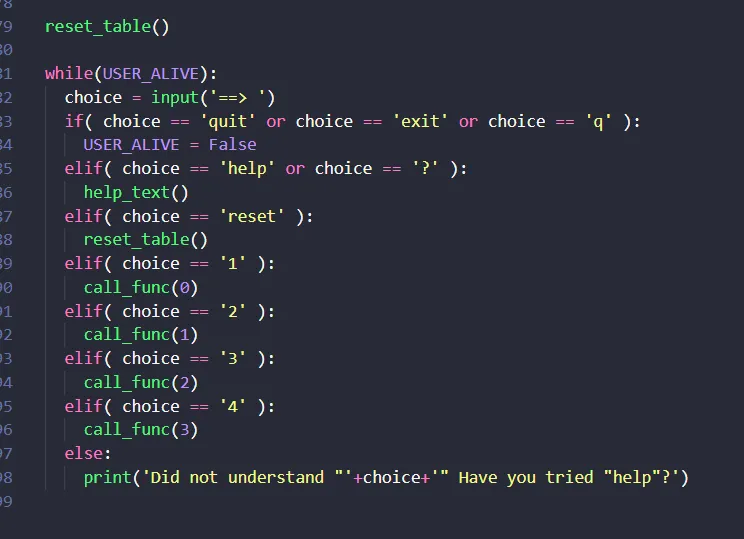
After reading through the functions, this is the one that lets us exploit the vulnerability - the reset_table function. Why? Walking through the if-else statements let me connect how the sub-functions get called, and from there here’s how I exploited it:
- When running the code, you get some inputs like:
quit,help,reset, and 4 other options. I tried running and using those options, and pretty much the only one that caught my attention waswrite_variable, because I noticed it basically grants full permission without checking the user’s input at all. So I tried swappingprint_tablewithwin, and it actually worked!
Here’s how I did it:
- Choose option 3, then enter
print_tableto select it as the option I want to swap.
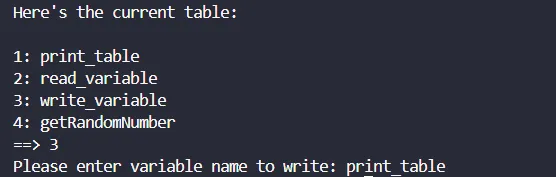
- Then enter
winto pick the function we’re going to grab.
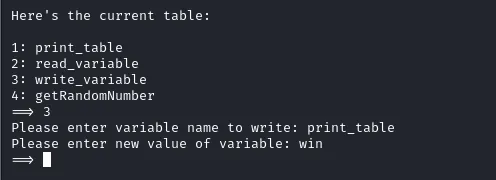
- The result is a chunk of hex containing the flag.

- Now we just need to decode it, and we’re done.

Flag: picoCTF{7h15_15_wh47_w3_g37_w17h_u53r5_1n_ch4rg3_c20f5222}